Enpossibilities Journal: Explore, Learn, Connect

Why You Shouldn’t Ignore Your Solar Inverter’s Cooling Fan

by | Sep 24, 2026 | blog, solar inverter

Your solar inverter works hard, often for 10+ hours a day, turning the power your panels generate into electricity you can actually use. All that work generates heat — and that’s where the cooling fan comes in.
The fan’s job is simple: pull hot air out of the inverter and keep things from overheating. But like any moving part, it needs a bit of attention now and then. Skip that, and you could run into trouble down the line.

Why Inverters Need a Fan in the First Place

Inverters heat up as they run, especially on hot days or when they’re pushing out a lot of power. The fan keeps air moving so that heat doesn’t build up.
The problem is dust. Over time, it settles on the fan and the vents, and once airflow gets blocked, the inverter starts running hotter than it should. That can lead to:
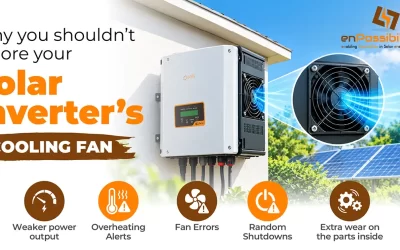
• Weaker power output
• Overheating alerts
• Fan errors
• Random shutdowns
• Extra wear on the parts inside
None of that is dramatic on its own, but it adds up — which is why a clean fan matters more than people think.

What You Actually Get From Keeping the Fan Clean

It keeps the inverter cool. A clean fan moves air freely. A clogged one can’t, and the inverter heats up as a result — especially in summer.
It helps the inverter last longer. Heat is hard on electronics. Keep the fan clear and you’re taking a bit of stress off the internal components over time.
It protects your power output. Inverters are built to protect themselves — if they get too hot, they’ll throttle down power automatically, usually right when your panels are producing the most. A working fan helps avoid that.
It helps you catch problems early. Fans tend to make noise before they fail completely, or the inverter will flash a warning. Checking in regularly means you catch it while it’s still a small fix.
It saves you money. A repair bill is always bigger than a maintenance bill. Cleaning the vents and checking the fan takes a few minutes and can save you a much bigger headache later.
It matters more in dusty or hot climates. If your inverter is near a farm, a construction site, or just somewhere dusty and hot, the fan gets dirty faster — so it deserves more frequent attention.

How to Actually Maintain It

• Wipe down the fan and vents. A soft brush or a can of compressed air works well for the outside.
• Keep the surrounding area clear. Don’t let leaves, cobwebs, or plants pile up near the vents.
• Listen for odd sounds. Grinding or rattling usually means something’s wrong.
• Check that it’s actually spinning when the system is running and needs cooling.
• Call a technician if it’s not working. Don’t try to fix or replace it yourself — and never open the inverter unless you’re trained to work with electrical equipment.

Signs the Fan Needs Attention
• A fan or temperature warning on the display
• Strange noises
• Visible dust buildup near the vents
• The fan not spinning
• Power output dropping on hot days
• The inverter shutting off from overheating
If you spot any of these, it’s worth getting it looked at sooner rather than later.

Common Questions

How often should I clean it?

There’s no universal schedule — check it every few months if you’re in a normal environment. In dustier spots, check more often. Your inverter’s manual will usually have specifics.

Can a dirty fan really hurt power output?

Yes. Once dust blocks airflow, the inverter heats up and may automatically cut back power to protect itself.

What happens if the fan just stops?

The inverter will likely overheat — expect a warning, reduced output, or a shutdown, depending on the model. At that point, the fan usually needs replacing.

Can I clean it myself?

The outside vents, sure — if your manufacturer says it’s okay. Just follow the proper shutdown steps first, and never touch anything inside the unit unless you’re qualified.

Do all inverters have fans?

No — some use passive cooling instead. If yours does have a fan, it’s worth checking on regularly.

How do I know if mine’s overheating?

Watch for temperature warnings, sudden drops in output, random shutdowns, or unusual fan noise.

Bottom Line
Taking care of your inverter’s fan isn’t complicated — it’s a five-minute job that pays off. Keep it clean, keep the area around it clear, and call in a professional if something seems off. That’s really all it takes to keep your system running smoothly for years.

Real-World Example: Cotton Mill
In a cotton mill, the air can contain a lot of fine cotton fibres and dust. Over time, these particles can enter the inverter’s cooling area and accumulate around the heatsink and cooling fan.
When the fan and heatsink become covered with cotton particles, airflow can reduce and heat may not escape properly. This can cause the inverter to operate at a higher temperature and may affect its performance over time.
That’s why regular cleaning and fan maintenance are especially important in dusty industrial environments like cotton mills.